Artistic Transformation Prompts & Styles in Nano Banana
Turn photos into gallery art, anime scenes, oil paintings, and exhibition posters with Nano Banana. Master image-to-image style transfer prompt engineering.
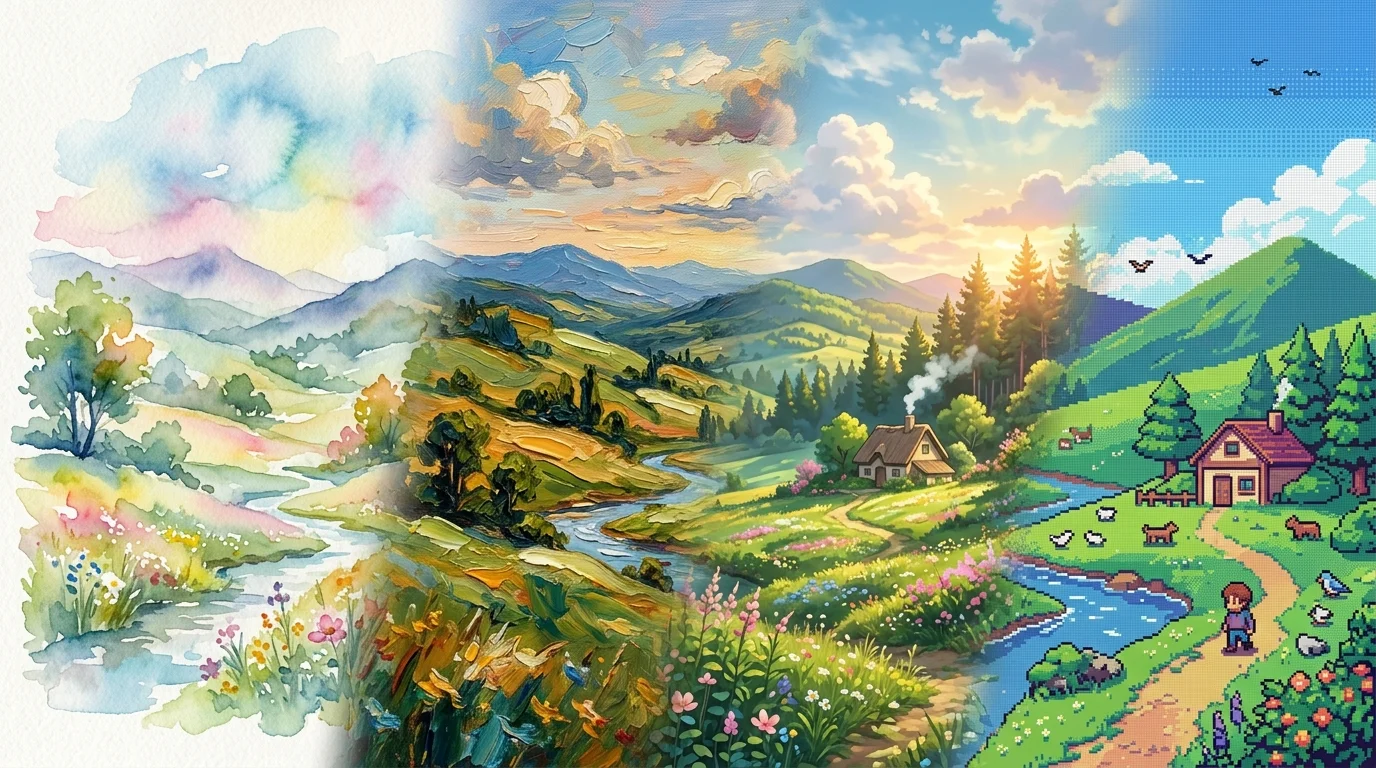
Artistic transformation is one of the most powerful workflows in Nano Banana: taking an existing photograph or scene and re-rendering it into a completely different artistic medium—from gallery-grade exhibition posters to luminous watercolors, Studio Ghibli-inspired anime, and retro pixel art—while faithfully preserving the underlying composition, landmarks, and spatial geometry.
Unlike text-to-image generation from scratch, image-to-image artistic transformations anchor themselves to your source photo's perspective, silhouettes, and lighting. Mastering this technique requires balancing two opposing forces: Preservation (keeping the scene recognizable) and Transformation (pushing the medium's tactile materiality).
The 3-Tier Transformation Formula
To consistently transform photos without getting a superficial color filter, structure your prompt using the canonical 3-tier schema:
[Subject Image] Transform this photo into a [Target Style / Medium].

Preserve:
- Exact composition, horizon line, and architectural silhouette
- Spatial depth, perspective angles, and landmark positions

Transform:
- Art Style: [Target aesthetic, movement, or studio reference]
- Technique: [Medium-specific terminology: wet-on-wet, impasto, cel-shaded]
- Materiality & Texture: [Cold-press paper tooth, linen canvas, 16-bit dithering]

Lighting & Palette:
- [Extracted harmony from source photo or targeted palette shift]
Example Starting Image
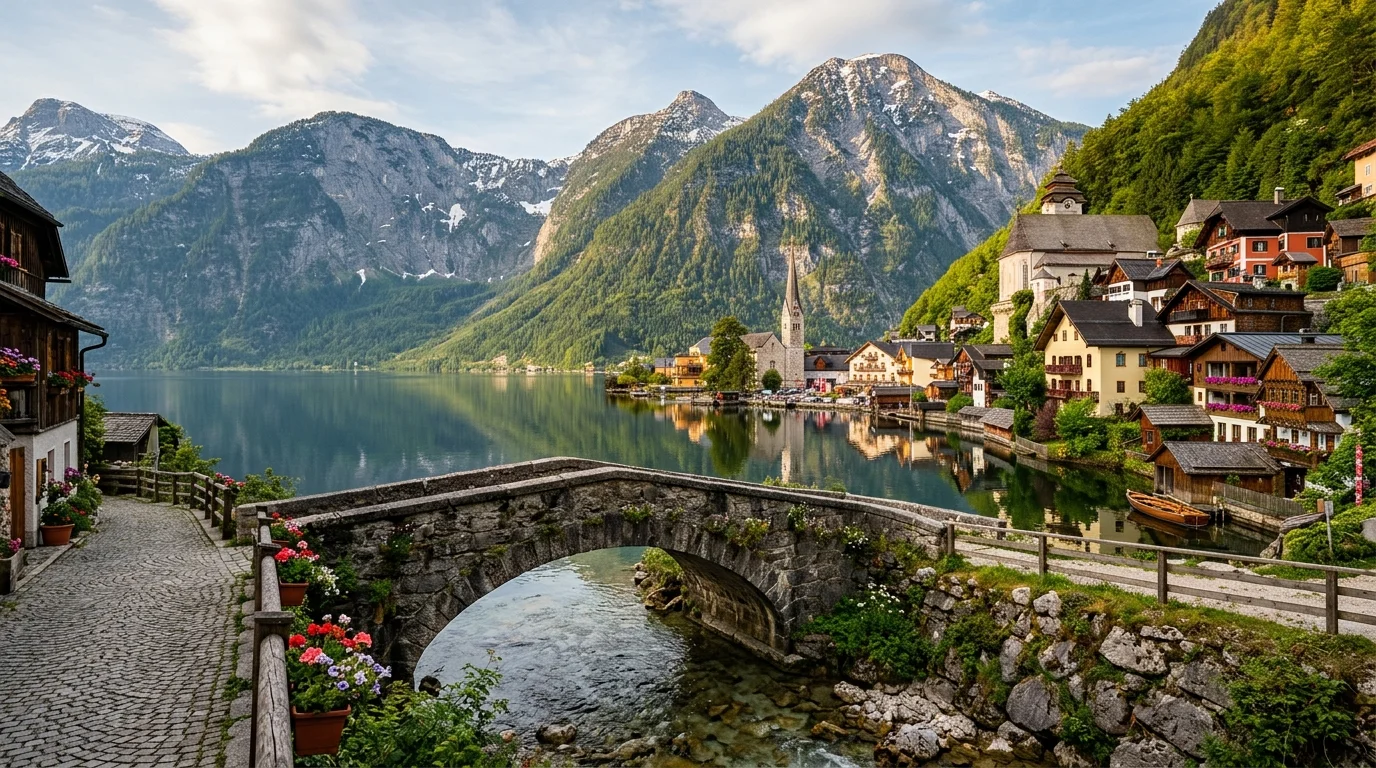
For all the transformation examples in this guide, we use this single high-detail landscape photo of an alpine lakeside village featuring an arched stone bridge, timber cottages, and mountain peaks:
1. The 50:50 Dual-Zone Exhibition Poster
This viral transformation technique creates a modern Scandinavian gallery exhibition poster by dividing the canvas into two equal zones: the untouched reality on top, and an architectural blueprint and silkscreen collage below.
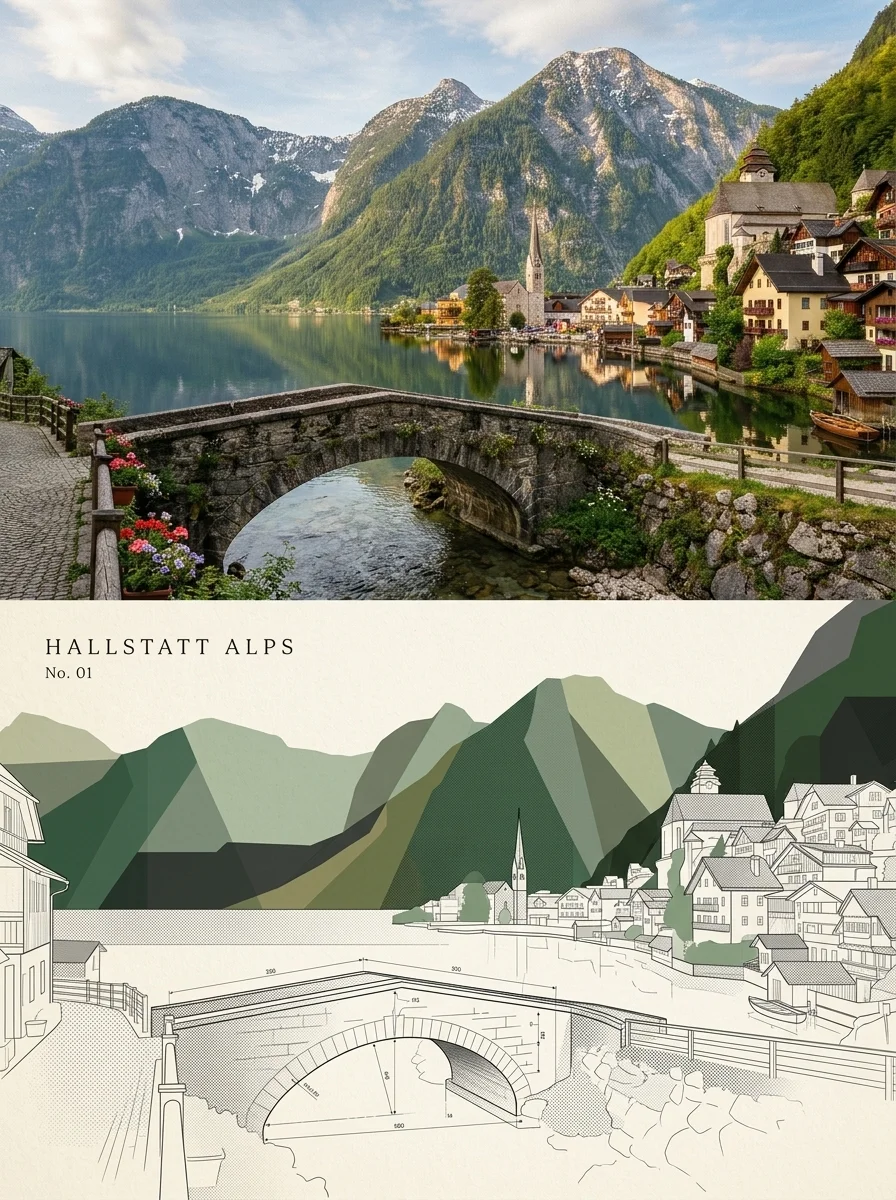
[Subject Image] Transform this photo into an independent luxury art exhibition poster. Layout & Canvas: - Vertical 3:4 aspect ratio, strictly divided 50:50 top and bottom Top Half (Preserve & Enhance): - Faithfully display the original photograph with subtle film grain - Architectural magazine and gallery-grade color grading - Preserve terrain, architecture, bridge, and natural lighting without distortion Bottom Half (Architectural Recomposition): - Background: Warm textured ivory paper (#F7F4EE) - Medium: Architectural collage + silkscreen print + technical blueprint drafting - Render: Translucent geometric color planes (forest green, sage, olive, charcoal), fine drafting lines, and subtle textures dissolving downward - Palette: Extracted directly from the photo's natural tones Typography & Metadata: - Top-left of bottom half: "HALLSTATT ALPS" in widely-spaced delicate serif font - Sub-text: "No. 01" directly underneath - Aesthetic: Modern art museum exhibition, quiet luxury, minimalist
Why This Works
- The 50:50 Duality: By juxtaposing the photographic top with the abstract bottom, the image visually demonstrates the transformation process inside a single frame.
- Silkscreen + Blueprint Keywords: Requesting "translucent color planes" and "technical drafting lines" prevents generic vector clip-art and forces precise architectural linework.
- Color Extraction: Anchoring the bottom half's palette to the natural colors of the photo maintains chromatic harmony across the split.
2. Photo to Luminous Watercolor Painting
Transforming photos into watercolor requires pushing the model toward pigment fluidity, edge bleeding, and paper absorption.
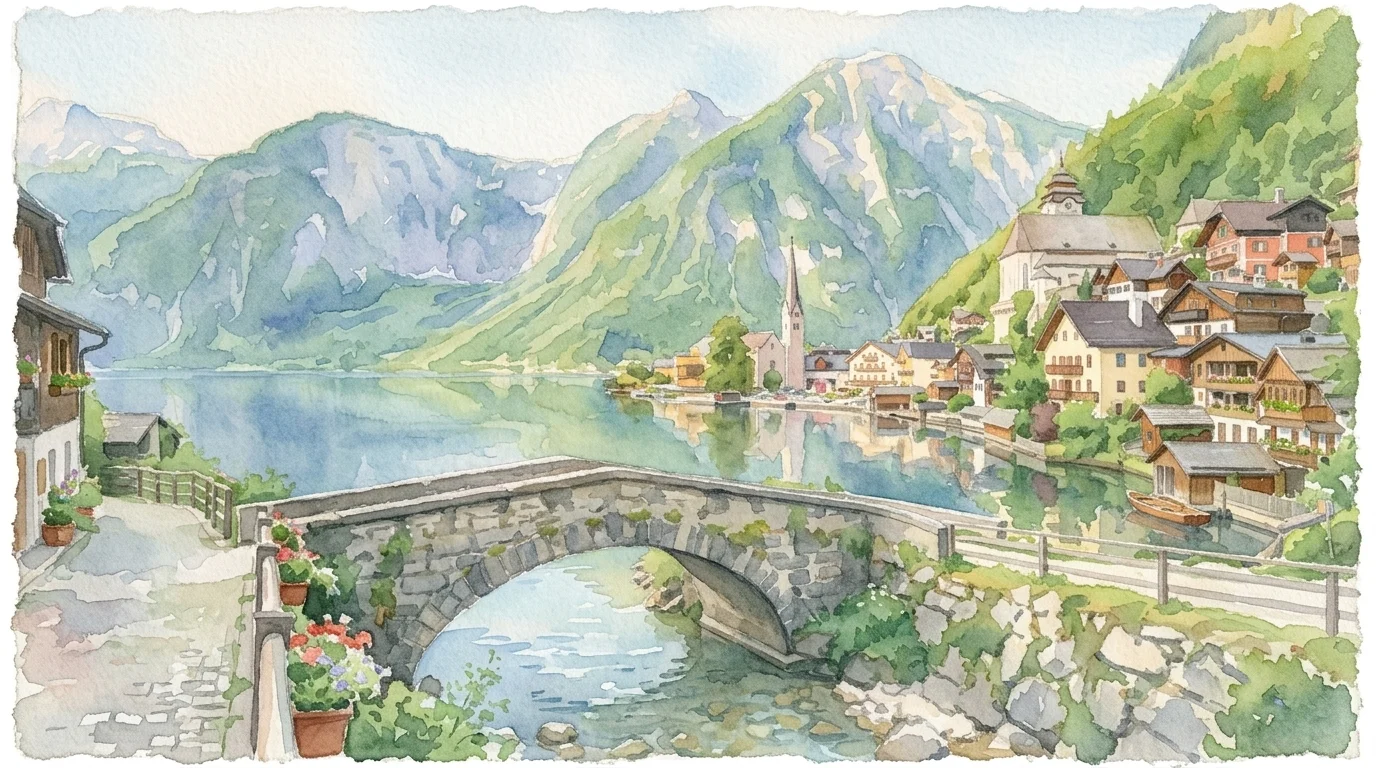
[Subject Image] Transform this scene into a fine art watercolor painting. Preserve: - Composition, stone bridge geometry, village skyline, and mountain silhouettes - Mirror reflections in the lake and foreground cobblestone walkway Transform: - Style: Luminous contemporary watercolor on heavy 300gsm cold-press paper - Technique: Loose wet-on-wet washes, pigment blooms, soft diffused edges - Texture: Visible paper grain, subtle deckled paper border, delicate paint splatters - Palette: Cobalt blues, cerulean lake, soft sage greens, warm ochre accents - Feel: Airy, delicate, serene, painterly
Why This Works
- Medium-Specific Terminology: Keywords like "wet-on-wet washes", "pigment blooms", and "300gsm cold-press paper" instruct Nano Banana to simulate water physics rather than applying a simple watercolor Photoshop filter.
- Edge Diffusion: Specifying "soft diffused edges" softens harsh digital outlines into organic paint gradients.
3. Photo to Studio Ghibli-Inspired Anime
Anime transformations succeed when they translate real-world lighting into stylized cel-shading and hand-drawn nostalgia.
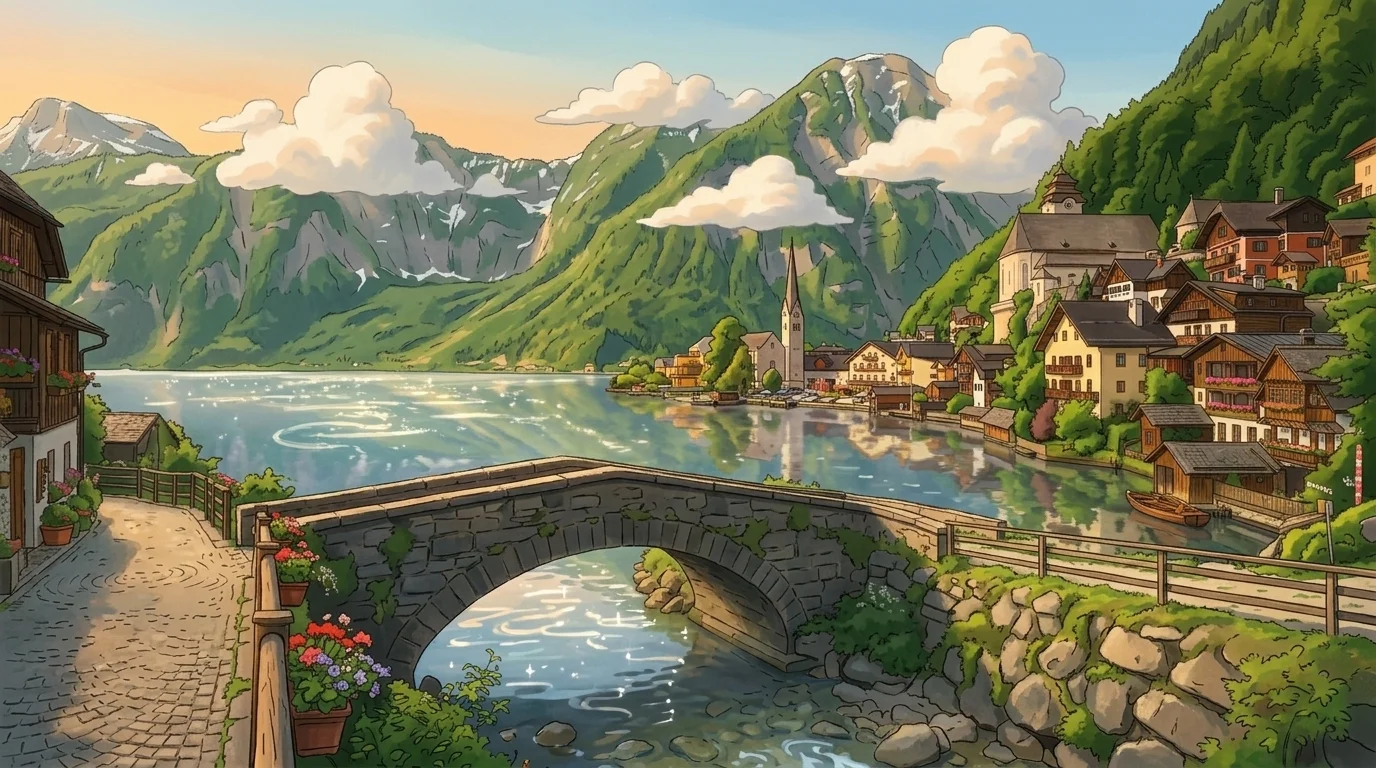
[Subject Image] Transform this scene into Studio Ghibli-inspired anime background art. Preserve: - Layout of the stone bridge, timber cottages, lake shoreline, and towering mountains - Perspective angle and focal depth of the original photo Transform: - Art Style: 1990s hand-painted anime background (Studio Ghibli / CoMix Wave aesthetic) - Technique: Clean crisp line work, layered cel shading, painted gouache textures - Lighting: Golden hour warm sunlight, glowing highlights on water, fluffy painted cumulus clouds - Palette: Saturated verdant greens, clear turquoise lake, warm terracotta roofs - Feel: Whimsical, nostalgic, cinematic, hand-drawn
Why This Works
- Specific Studio Attribution: Referencing "Studio Ghibli" and "painted gouache textures" steers the engine toward hand-painted film backgrounds with rich atmosphere rather than flat TV anime vectors.
- Atmospheric Volume: Adding "fluffy painted cumulus clouds" and "golden hour highlights" introduces the dreamy depth characteristic of premium anime scenery.
4. Photo to Impasto Oil Painting
For dramatic gallery presence, impasto transformations emphasize physical paint buildup, heavy palette knife strokes, and coarse linen textures.
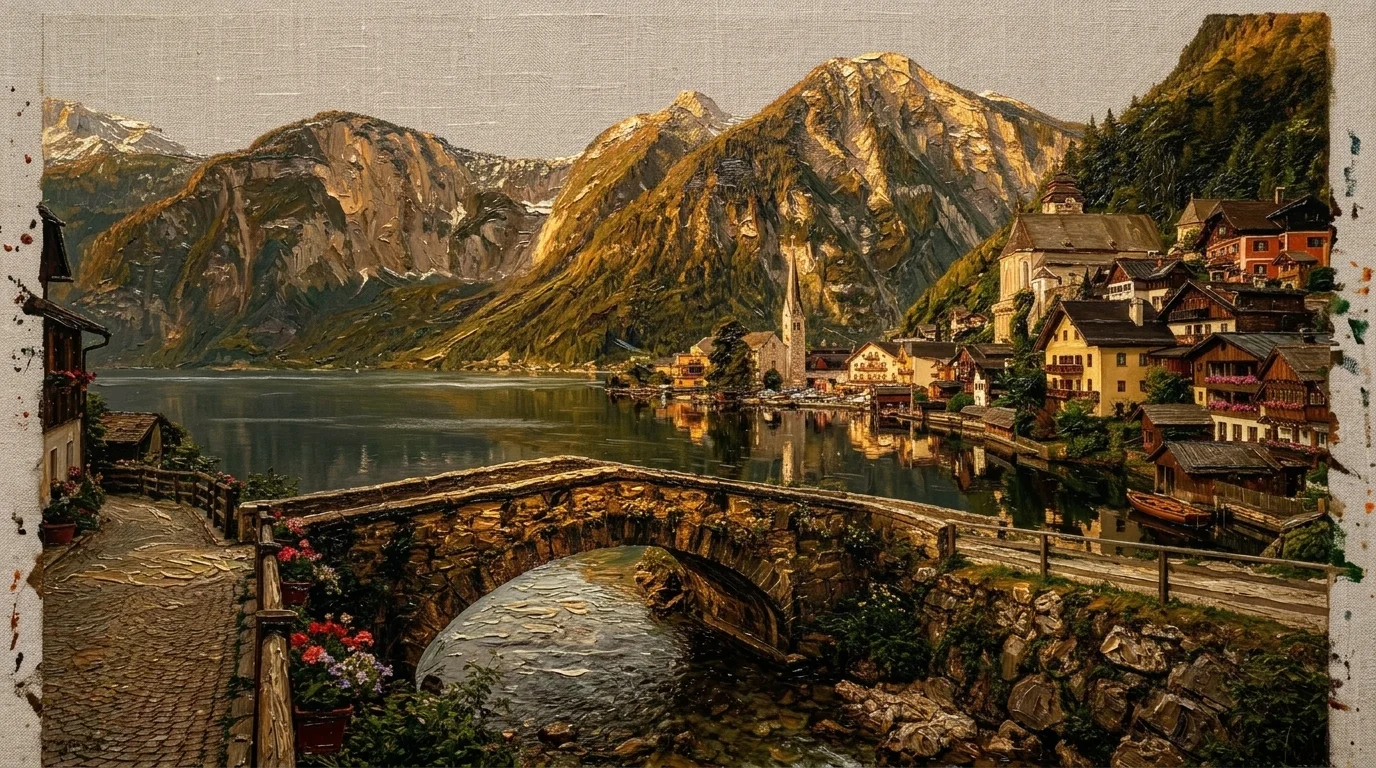
[Subject Image] Transform this scene into a classical impasto oil painting. Preserve: - Composition, stone bridge arch, waterfront buildings, and mountain peaks - Key reflections across the lake surface Transform: - Style: Masterful late 19th-century European landscape painting - Technique: Heavy impasto, thick visible palette knife strokes, textured paint buildup - Medium: Oil on coarse linen canvas with visible weave and exposed primed edges - Lighting: Dramatic chiaroscuro, warm raking sunlight grazing mountain rock faces - Palette: Rich burnt sienna, deep forest umber, ochre, muted Prussian blue - Feel: Tactile, museum-worthy, expressive, timeless
Why This Works
- Tactile Texture Cues: Phrases like "thick visible palette knife strokes" and "coarse linen canvas with visible weave" tell the renderer to model 3D light interactions on the physical paint surface.
- Raking Light: Specifying "raking sunlight grazing mountain rock faces" creates high-contrast micro-shadows along the simulated brush ridges.
5. Photo to 16-Bit Retro Pixel Art
Pixel art transformations distill complex organic scenery into a constrained, nostalgic color palette and grid alignment.
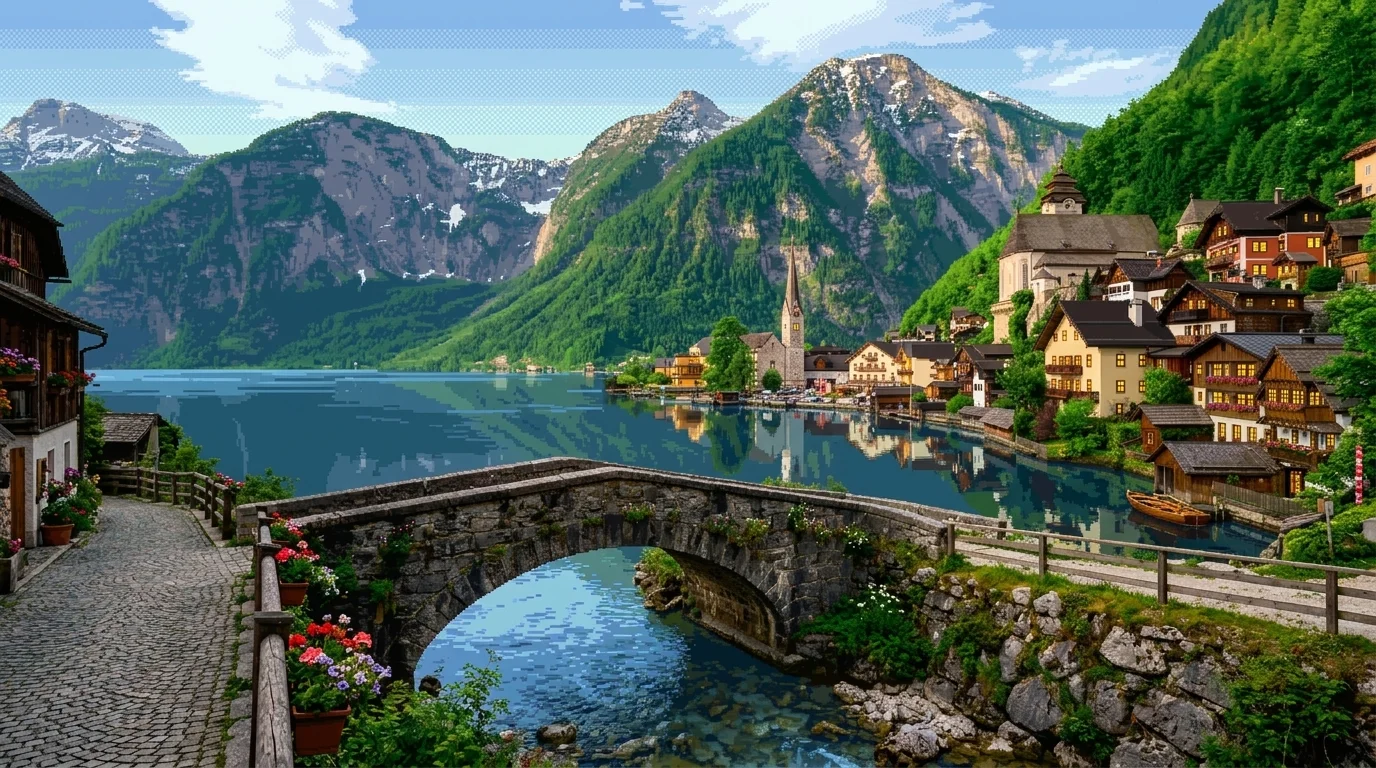
[Subject Image] Transform this scene into retro 16-bit pixel art. Preserve: - Basic silhouette of the arched bridge, timber houses, and mountain horizon - Compositional perspective and water shoreline Transform: - Style: 16-bit Super Nintendo / PC-98 adventure game background - Technique: Sharp visible square pixels, deliberate pixel clustering, ordered dithering - Constraints: Strict 32-color retro palette, no bilinear filtering, no anti-aliasing blur - Details: Glowing pixel lanterns in windows, crisp water ripples, distinct stone block patterns - Feel: Nostalgic, charming, retro game world
Why This Works
- Negative Constraints: Terms like "no bilinear filtering" and "no anti-aliasing blur" prevent the AI from generating soft, smeared edges, keeping pixel blocks sharp and discrete.
- Palette Limitation: Forcing a "strict 32-color retro palette" simulates legacy hardware limitations that define the true 16-bit aesthetic.
6. Photo to Architectural Swatch & Dissolving Blueprint Poster
This standalone high-end art poster transformation strictly separates real-world photographic fidelity in the upper half from an architectural deconstruction of translucent color swatches, fine technical drafting lines, and dissolving hairline textures in the lower half.
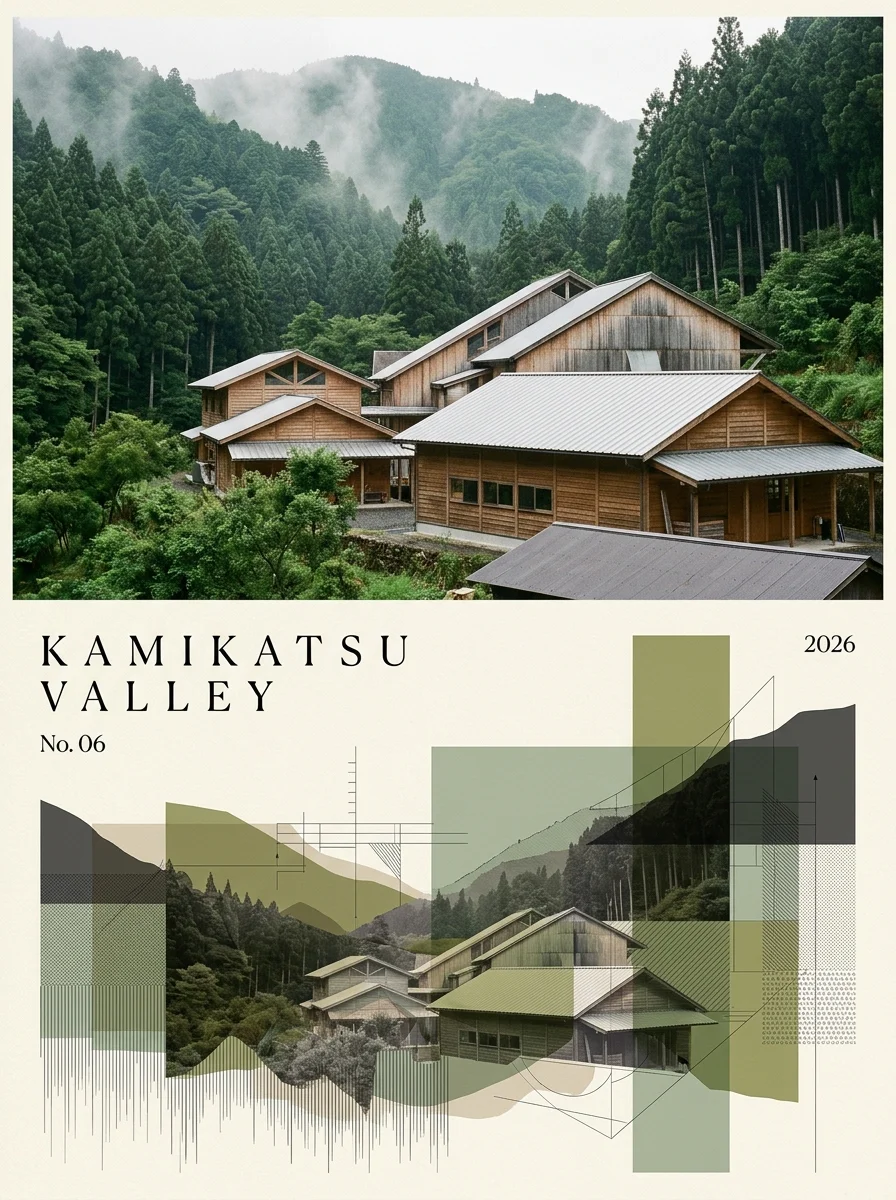
Please transform each uploaded photo into a single, standalone high-end art poster per photo. Do not create a collage of multiple photos. The overall composition should be in a 3:4 vertical format, strictly divided into equal 50:50 halves at the top and bottom. The upper half should faithfully use the original photo, without altering the subject, terrain, architecture, texture, light, color, or positional relationships, and only add delicate color grading reminiscent of an architecture magazine or photo exhibition, along with a very subtle film grain. If necessary, the sky or surrounding environment can be naturally extended, but do not distort, move, or change the main subject. The lower half should be set against a warm ivory paper background and reconstruct the same landscape in a style reminiscent of "architectural collage + silkscreen + blueprints." Avoid simple geometric illustrations; instead, express elements extracted from the photo—such as terrain, buildings, plants, paths, and steps—using translucent color fields, overlapping rectangles, thin drafting lines, and partially retained photographic textures. At the bottom edge, incorporate a lingering aftereffect where faint vertical fragments or thin lines fade downward. For the color palette, center on deep greens, blue-greens, olives, sages, and charcoals extracted from the photo, while retaining just one characteristic color as an accent in a single spot. In the upper left of the lower half, place a 2–3 word English title representing the photo, set in a delicate serif font with wide letter spacing. Below it, add a number (e.g., No. 01), and in the upper right, place the year in small type. Design it with the serene, sense-of-place aesthetic of an international architecture firm, a contemporary art exhibition, or a high-quality travel magazine. Avoid simplistic mountain logos, bland flat illustrations, generic landscapes, child-oriented styles, 3D effects, cyber expressions, cheap template vibes, unnecessary text, or logos.
Why This Works
- Exact Vertical 50:50 Framing: Specifying "strictly divided into equal 50:50 halves in a 3:4 vertical format" ensures a clean horizontal boundary without diagonal skew.
- Architectural Collage & Dissolving Edges: Combining "translucent color fields, overlapping rectangles, thin drafting lines" with "faint vertical fragments fading downward" prevents generic flat graphics and produces a gallery-grade editorial look.
- Typographic Hierarchy: The prompt explicitly locks in the serif font placement, wide tracking, catalog numbering, and date stamp to mimic architectural monographs.
7. Alpine Village to Architectural Blueprint Poster
Applying the 50:50 architectural swatch transformation directly to this guide's base alpine lakeside village photo (base-photo.webp):
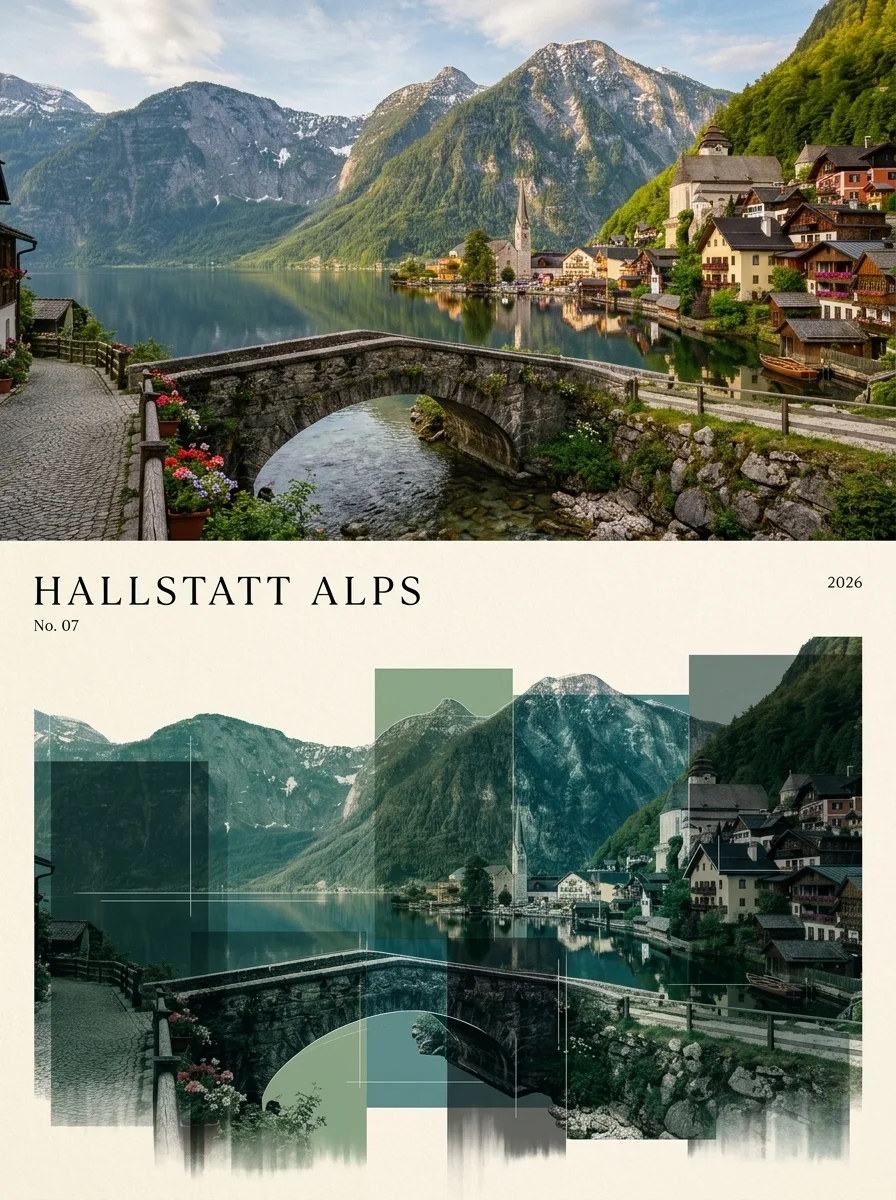
Please transform each uploaded photo into a single, standalone high-end art poster per photo. Do not create a collage of multiple photos. The overall composition should be in a 3:4 vertical format, strictly divided into equal 50:50 halves at the top and bottom. The upper half should faithfully use the original photo, without altering the subject, terrain, architecture, texture, light, color, or positional relationships, and only add delicate color grading reminiscent of an architecture magazine or photo exhibition, along with a very subtle film grain. If necessary, the sky or surrounding environment can be naturally extended, but do not distort, move, or change the main subject. The lower half should be set against a warm ivory paper background and reconstruct the same landscape in a style reminiscent of "architectural collage + silkscreen + blueprints." Avoid simple geometric illustrations; instead, express elements extracted from the photo—such as terrain, buildings, plants, paths, and steps—using translucent color fields, overlapping rectangles, thin drafting lines, and partially retained photographic textures. At the bottom edge, incorporate a lingering aftereffect where faint vertical fragments or thin lines fade downward. For the color palette, center on deep greens, blue-greens, olives, sages, and charcoals extracted from the photo, while retaining just one characteristic color as an accent in a single spot. In the upper left of the lower half, place a 2–3 word English title representing the photo, set in a delicate serif font with wide letter spacing. Below it, add a number (e.g., No. 07), and in the upper right, place the year in small type. Design it with the serene, sense-of-place aesthetic of an international architecture firm, a contemporary art exhibition, or a high-quality travel magazine. Avoid simplistic mountain logos, bland flat illustrations, generic landscapes, child-oriented styles, 3D effects, cyber expressions, cheap template vibes, unnecessary text, or logos.
Why This Works
- Direct Base Image Alignment: Transformed directly from our guide's starting photo (
base-photo.webp), demonstrating how the stone bridge arch, waterfront chalets, and mountain contours seamlessly carry over into translucent green and charcoal drafting fields. - Preserved Geological & Architectural Form: The upper mountain ridges guide the geometric height of the lower color blocks, maintaining the viewer's eye-line across the split.
- Palette Cohesion: The alpine lake's emerald waters and pine forest slopes provide the exact deep greens, sage, and blue-greens used in the lower silkscreen breakdown.
Artistic Transformation Reference Matrix
Use this cheat sheet to choose the right medium keywords for your source images:
| Target Style | Primary Medium Keyword | Essential Texture / Technique Modifiers | Recommended Canvas Ratio |
|---|---|---|---|
| Exhibition Poster | Architectural collage, silkscreen print | Translucent color planes, blueprint drafting, ivory paper | 3:4 or 2:3 |
| Watercolor | Luminous watercolor wash | Wet-on-wet, pigment blooms, 300gsm cold-press paper | 16:9 or 4:3 |
| Anime Scenery | Studio Ghibli background art | Cel shading, clean line art, painted gouache, golden hour | 16:9 |
| Impasto Oil | Classical impasto oil painting | Palette knife strokes, thick paint buildup, coarse linen canvas | 16:9 or 1:1 |
| Pixel Art | 16-bit adventure game pixel art | Square pixels, ordered dithering, 32-color palette, no blur | 16:9 or 4:3 |
| Ukiyo-e Woodblock | Traditional Japanese woodblock print | Bokashi color gradation, washi paper texture, bold ink outlines | 3:4 or 1:1 |
Troubleshooting & Pro Tips
Related Guides & Workflows
- Character Reimagining Guide — Master avatar style transfers and portrait transformations.
- Posters & Promotional Design — Create exhibition posters, festival graphics, and marketing layouts.
Related Articles & Guides
 #nano-banana
Art Styles & Themes with Nano Banana
Generate and reimagine scenes in distinct art styles with Nano Banana, from cyberpunk neon cities to painterly and retro aesthetics.
 #nano-banana
Cyberpunk Scene Prompts for Nano Banana
Generate neon-drenched cyberpunk scenes with Nano Banana. Ready-to-use prompts for megacities, rainy alleys, sci-fi interiors, and dystopian landscapes.
 #nano-banana
Logo Design Prompts for Nano Banana
Design logo concepts with Nano Banana. Ready-to-use prompts for minimalist, mascot, wordmark, and badge styles with pro tips for branding.